
Download Proxifier and route every app through your proxies
Proxifier is a desktop proxy client for Windows 11, Windows 10, and macOS that routes any application — even ones without proxy support — through your SOCKS or HTTPS proxies and proxy chains.
Need no install or admin rights? Get the Windows Portable Edition.
Everything you need to take control of your network traffic
Rule-based, transparent, and reliable. Proxifier does the heavy lifting so your applications don't have to know anything about proxies.

Proxy Everything
Run any application through a proxy, even those without built-in proxy support — transparently and system-wide.

Master Your Corporate Network
Tunnel through corporate proxies with NTLM authentication and run Proxifier as a Windows Service.

Improve Your Connection
Route traffic through faster paths and use proxy redundancy to keep connections alive when a server fails.

Security & Privacy
A lightweight VPN alternative. Keep your real IP private and resolve DNS through the proxy.

Exceed Limitations
Work past network restrictions and access resources that would otherwise be unreachable.

Flexibility
Define rule-based, per-application proxies and chains with full XML configuration import and export.
Download Proxifier for Windows 10 and Windows 11
Download Proxifier for Windows 10 or Windows 11, or get the native Proxifier desktop app for macOS. The same powerful routing engine on every platform — installer is roughly 4 MB.
Windows 10 & 11
Proxifier 4.14 · .exe · 64-bit desktop installer
The full Proxifier client for Windows 11 and Windows 10. Install once and route every app system-wide.
Download for WindowsmacOS
Proxifier 3.15 · .dmg · Apple silicon & Intel
The native macOS desktop client with the same rule engine and proxy chains as the Windows edition.
Download for macOSWindows Portable
Proxifier 4.14 · .zip · no install, no admin
Run Proxifier on Windows without installing it or needing administrator rights — ideal for locked-down PCs.
Get Portable EditionDownload the Proxifier desktop app above. System requirements: Windows 11 or Windows 10 (64-bit), or macOS 10.13+. Every download includes a full-featured 31-day free trial.
Proxifier is fully compatible with both Windows 10 and Windows 11 desktop editions, so you get the same routing engine, rules, and free updates on either version — there's no separate Windows 10 or Windows 11 build to choose between.
See exactly how Proxifier routes an app
Pick an application and a proxy, toggle routing on or off, and watch the connection reroute in real time — no install needed.
Illustrative demo. Proxy servers and latencies are examples — Proxifier works with the proxies you already have.
A clean, native interface built for real work
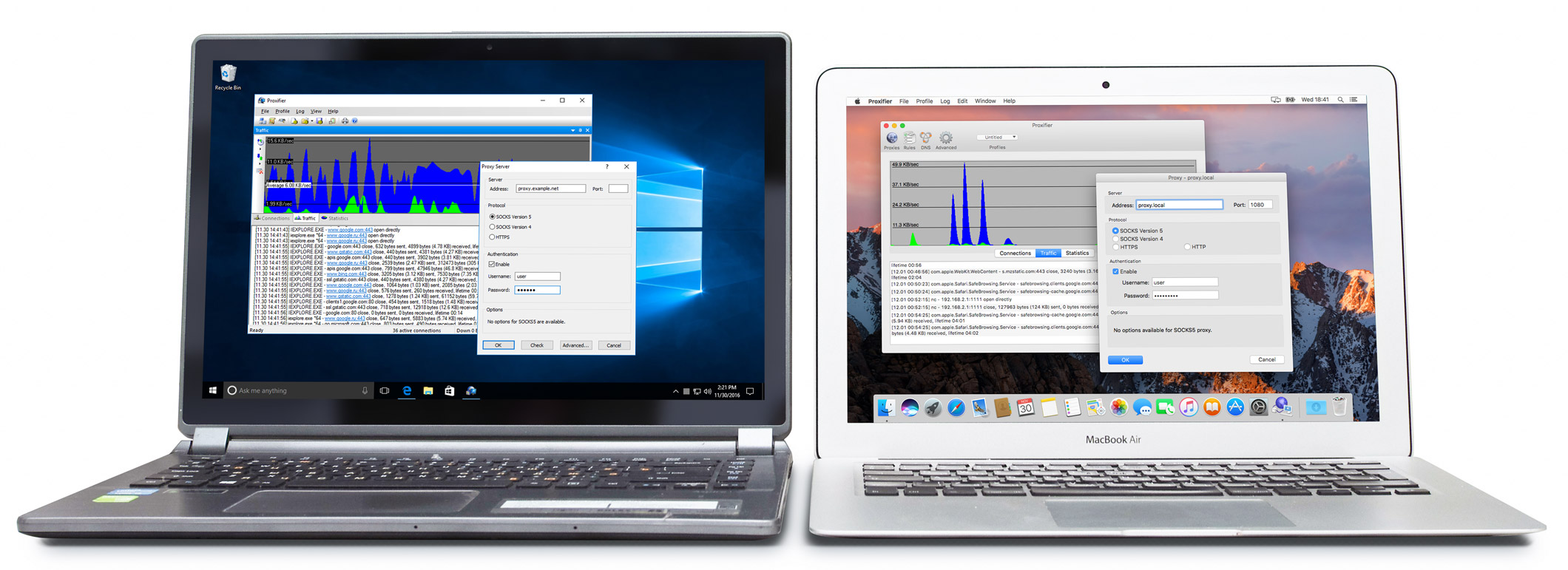
Monitor live connections, build precise routing rules, and manage every proxy from one native window.
Watch every connection, live
The main window shows active connections in real time — which app, which proxy, how much data — so you always know exactly where your traffic is going.
- Live connection view with per-app traffic and rule match
- Detailed log of every routing decision in real time
- Traffic and statistics panes for quick diagnostics
- Live connections
- Proxy chains
- DNS via Proxy
- Proxy Checker
From a single laptop to a managed corporate network
The same engine supports a wide range of protocols and setups — IPv6, HTTP(S), SOCKS4/5, NTLM, and more.
Corporate networks
Authenticate to corporate proxies with NTLM and run Proxifier as a Windows Service across machines.
Privacy without a heavy VPN
Keep your real IP private and resolve DNS through the proxy as a lightweight VPN alternative.
Reliable connectivity
Use proxy redundancy and chains so a single failing server never takes your connection down.
Power users & developers
Route specific apps through specific proxies, test with the Proxy Checker, and version your XML config.
A native app, not a wrapper
Proxifier is a native C++ application with no third-party dependencies and a roughly 4 MB installer. A one-time payment gives you a perpetual license with free minor updates.
- IPv6
- HTTP(S)
- SOCKS4/5
- NTLM
- Windows Service
- Proxy Redundancy
How to use Proxifier
Learning how to use Proxifier takes just four steps to route any application through your proxy — the same process on Windows 11, Windows 10, and macOS.
Download & install
Download Proxifier for Windows 10/11 or macOS and run the installer. The Portable Edition needs no install or admin rights.
Add your proxy
Open Profile → Proxy Servers and add your SOCKS or HTTPS proxy with its host, port, and credentials — or build a chain.
Create a rule
In Profile → Proxification Rules, choose which apps, hosts, or ports use which proxy. Everything else stays direct.
Verify it works
Watch the Connections view to confirm your apps are routed in real time, with live traffic and the matched rule.
That's the whole setup. Once you know how to use Proxifier, you can add as many proxies and rules as you like — and the same four steps apply whether you run the Windows 10 desktop app, Windows 11, or macOS. Your existing applications keep working unchanged; only their traffic moves to the proxy you chose.
Proxifier vs. a VPN vs. manual setup
Per-application control without reconfiguring every app you run.
| Capability | Proxifier | Full VPN | Manual per-app |
|---|---|---|---|
| Per-application routing rules | ✓ | ✕ | limited |
| Works with apps lacking proxy support | ✓ | ✓ | ✕ |
| Proxy chains (multi-hop) | ✓ | ✕ | ✕ |
| Keep most traffic direct | ✓ | ✕ | ✓ |
| DNS resolved through proxy | ✓ | varies | ✕ |
| No per-app reconfiguration | ✓ | ✓ | ✕ |
One-time purchase, perpetual license
Try every feature free for 31 days. Buy once and keep it — free minor updates included.
Portable
Run without installing or admin rights.
- No installation needed
- Full routing engine
- Windows only
Standard
The full Proxifier client for one platform.
- All features & rule engine
- Proxy chains & NTLM
- Free minor updates
Multi-platform
Windows and macOS for the same user.
- Everything in Standard
- Windows + macOS
- Windows Service mode
Answers before you download
How do I download Proxifier for Windows 10 or Windows 11?
Click Download for Windows to get the Proxifier desktop installer (.exe), then run it on Windows 11 or Windows 10 (64-bit). Prefer no installation? Use the Windows Portable Edition, which needs no admin rights.
Does Proxifier work on Windows 11?
Yes. Proxifier 4.14 fully supports Windows 11 and Windows 10, and runs as a desktop app or a Windows Service for always-on, system-wide proxying.
How do I use Proxifier?
Install Proxifier, add your SOCKS or HTTPS proxy under Profile → Proxy Servers, create a proxification rule for the apps you want to route, and watch the Connections view confirm it. See the step-by-step guide above.
Is Proxifier a desktop app?
Yes. Proxifier is a native desktop proxy client for Windows and macOS — not a browser extension — so it can route any application on your computer, even ones without built-in proxy support.
What are the system requirements to download Proxifier?
The Proxifier desktop app runs on Windows 11 and Windows 10 (64-bit) or macOS 10.13 and later. The installer is roughly 4 MB, and the Windows Portable Edition runs with no installation and no administrator rights.
Is Proxifier free to download?
Yes — you can download Proxifier for Windows or macOS and use every feature free for 31 days. After the trial, a one-time license keeps the desktop app running, with free minor updates included.
Do you provide proxy server accounts?
No. We only provide and support the software. Proxifier works with the proxy servers you already have access to.
Do I need to reconfigure my apps?
No. Proxifier works transparently, so your applications keep running unchanged while their traffic is routed through your proxies.
How does licensing work?
A one-time payment grants a perpetual license with free minor updates. Each license allows one running instance, and Windows and macOS require separate licenses.
What are the trial limitations?
None. The trial has no feature limits, but it stops working after 31 days.
Can it run as a Windows Service?
Yes. Proxifier can run as a Windows Service for system-wide, always-on operation.
What is the difference between the Standard and Portable editions?
The Portable Edition needs no installation and no administrator rights, with some limitations compared to the Standard edition.
Start your free 31-day trial today
No feature limits, no proxy account required. Download Proxifier for Windows or macOS and have your apps routed through proxies in minutes.